쿠버네티스에서 신기하게 헬스 체크 하는 방법을 제공한다.
Deployment 를 생성할때 yml 파일에 추가 하면된다. 전체적인 코드이다.
....
spec:
 template:
  spec:
   containers:
     ....
          startupProbe:
            httpGet:
              path: "/startup"
              port: 8080
            periodSeconds: 5
            failureThreshold: 36
          readinessProbe:
            httpGet:
              path: "/readiness"
              port: 8080
            periodSeconds: 10
            failureThreshold: 3
          livenessProbe:
            httpGet:
              path: "/liveness"
              port: 8080
            periodSeconds: 10
            failureThreshold: 3
....
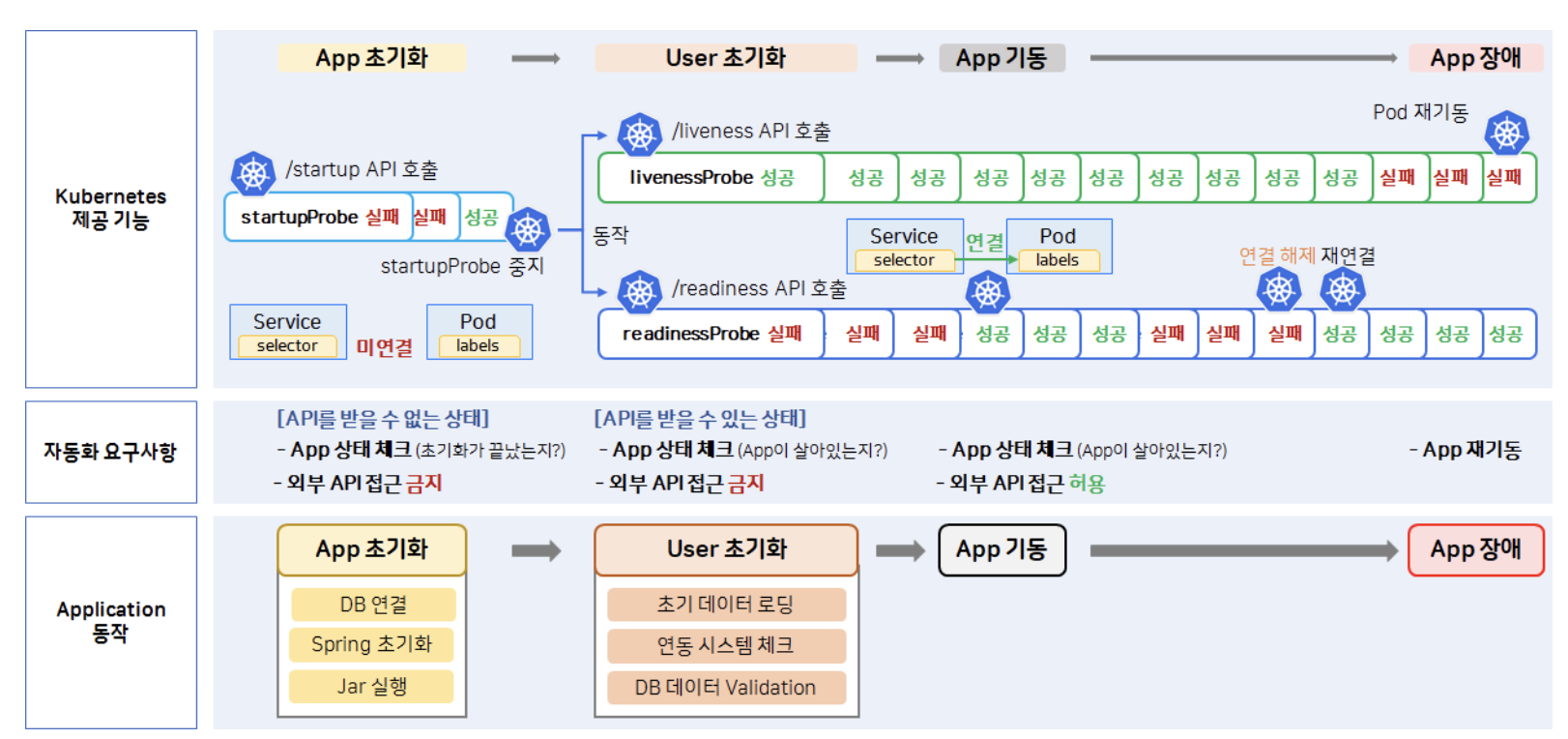
아래 표는 전체적인 와꾸이다.
startupProbe:
periodSeconds: 5 값이므로 5초 간격으로 호출 되고 성공할때 까지 반복 만약 성공이 되면 readinessProbe livenessProbe 가 시작
livenessProbe :
그 다음 성공 하시면 -> 여전히 readinessProbe 는 실패 10초 간격으로 failureThreshold 값이 3 이므로 만약 3번 호출 실패시 pod 재기동 하는 동작
livenessProbe까지 성공 로그가 올라오면 내부에선 동작은 되지만 외부 트레픽까지 받는건 조회가 안된다.
ex )
# 실패
curl http://192.168.56.30:31231/hello

# 성공
kubectl exec -n anotherclass-123 -it api-tester-1231-7459cd7df-2hdhk -- curl localhost:8080/hello
readinessProbe : 애플리케이션 컨테이너가 요청을 처리할 준비가 되었는지를 확인하는 데 사용됩니다
상태 코드로 200값이 반환 되도록 되어야됩니다.
이부분에선 200값이 리턴되면 완전한 준비가 되었다고 판단하여 service -> ( 연결 ) -> pod 가 붙어서 트레픽을 받습니다.
문제 : 일시적 장애 상황(App 내부 부하 증가)가 시작 된 후, 30초 뒤에 트래픽이 중단되고, 3분 뒤에는 App이 재기동 되도록 설정해 보세요.
"livenessProbe": {
    "httpGet": {
        "path": "/liveness",
        "port": 8080,
        "scheme": "HTTP"
    },
    "periodSeconds": 60,  # 60초간
    "failureThreshold": 3 # 3번 실패하면 재기동
},
"readinessProbe": {
    "httpGet": {
        "path": "/readiness",
        "port": 8080,
        "scheme": "HTTP"
    },
    "periodSeconds": 10,   # 10초간
    "failureThreshold": 3  # 3번 실패하면 트래픽 중단
}
문제 2 : Secret 파일(/usr/src/myapp/datasource/postgresql-info.yaml)이 존재하는지 체크하는 readinessProbe를 만들어 보세요.
readinessProbe:
  exec:
    command:
      - cat
      - /usr/src/myapp/datasource/postgresql-info.yaml
  initialDelaySeconds: 5
  periodSeconds: 10
  successThreshold: 1
  failureThreshold: 3